Virtual Memory Increasing due to Delivery Optimzation Settings Issue - Windows 11
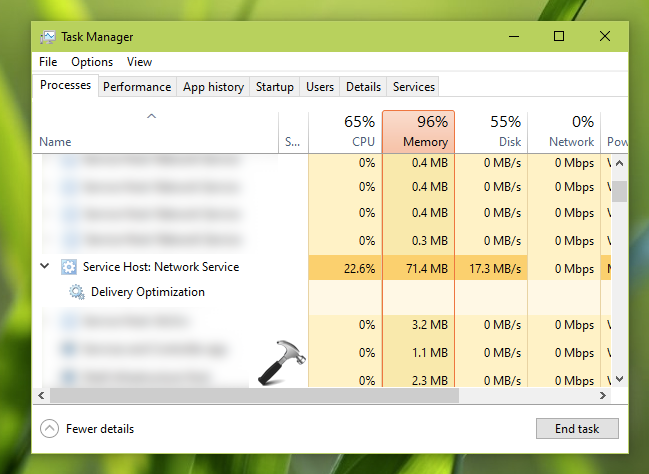
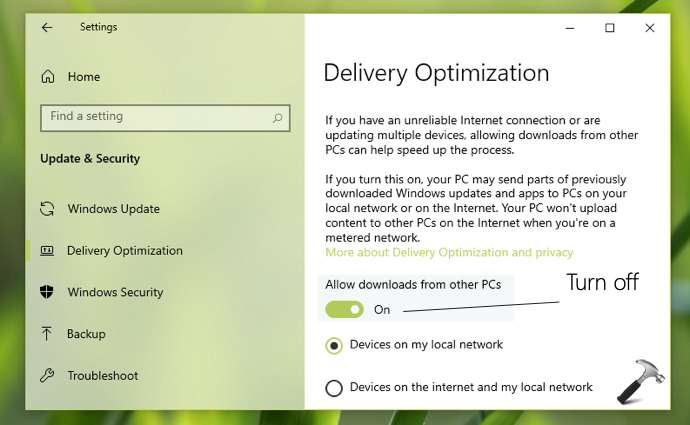
2. In Settings app, go to Update & Security > Delivery Optimization.
3. Under Delivery Optimization, turn Off the Allow downloads from other PCs option.
4. Close Settings app and see if this resolved the issue.
NEXT STEP
1. Open Group Policy Editor using gpedit.msc command.
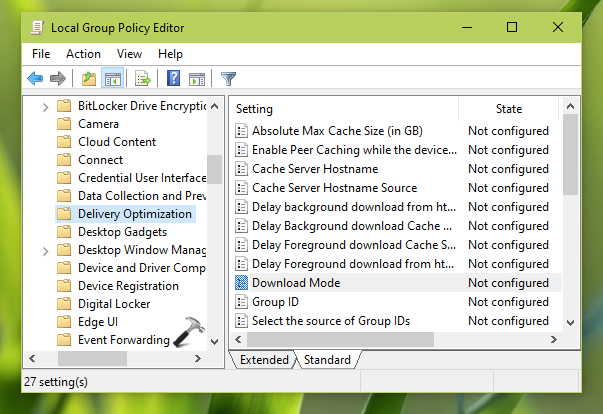
2. Go to Computer Configuration > Administrative Templates > Windows Components > Delivery Optimization.
3. In right pane of Delivery Optimization, locate the policy setting named Download mode. Double-click on it to modify its status.
2. Go to Computer Configuration > Administrative Templates > Windows Components > Delivery Optimization.
3. In right pane of Delivery Optimization, locate the policy setting named Download mode. Double-click on it to modify its status.
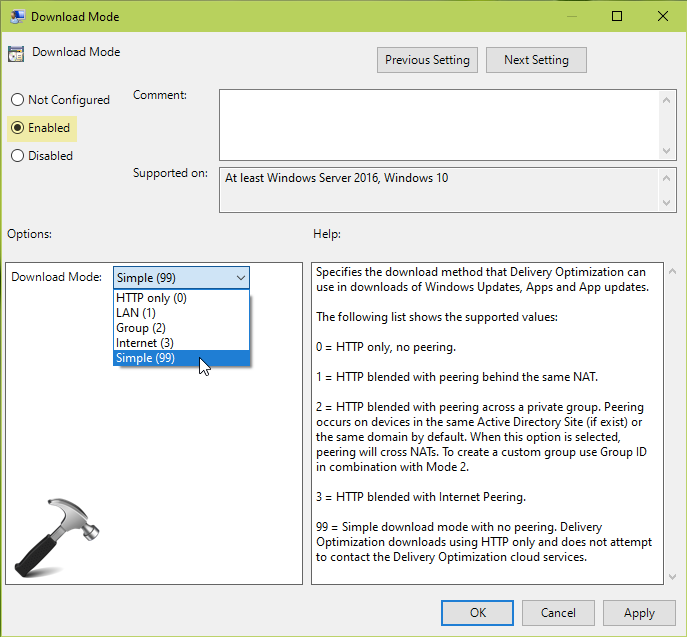
4. On the property configuration sheet, set policy to Enabled. Under Options, select Download Mode as Simple. Click Apply, OK.
5. Close Group Policy Editor and reboot your system.
Related Articles
Remove Windows Update PopUp
1. Set Active Hours (Prevents Restart Notifications During Business Hours) Go to Settings Click Windows Update Select Advanced options Click Active hours Set your operating hours manually 2. Pause Updates Go to Settings → Windows Update Click Pause ...Signage PC X5 - Windows Boot Issue
Here are the troubleshooting steps. First, type 'Exit' at the Shell prompt (at that error screen you shared with us), it should boot you into Windows. Once it boots into Windows then reboot the unit again and enter the BIOS. Next, we need to update ...Windows Startup Repair - Windows cannot repair this computer automatically
After Frequent power outages or improper shutdown can corrupt windows startup boot record, please follow these steps by attaching keyboard and mouse to fix it manually: click don't send. this will close the top popup windows. click View advanced ...Sign Player Multi Screen setup on a Windows Player
Setting up a Multi Screen On a Windows player you need to enable the Collage or Combine desktop Settings from the Intel Graphics Settings. You can go to Intel Graphics Support Settings Click on Display Activate Combine Desktop.How to disable Windows Creators Update Popup on Windows 10
Run regedit to open the Registry Editor, type the following in its address bar and hit Enter: HKLM\SOFTWARE\Microsoft\WindowsUpdate\UX\Settings\ Right-click in the right panel, select New > DWORD (32 bit) and name it HideMCTLink. Now double-click on ...