How to add a new player in Sign Studio
To add a new player to your Sign Studio account, please follow the steps below:
1) During the setup process, a 4-digit registration code will be displayed on the screen.
2) Open your signstudio account from the Website: www.edisplayinc.com
Click "Login to Sign Studio" in the top-right corner and sign in using your email address and password.
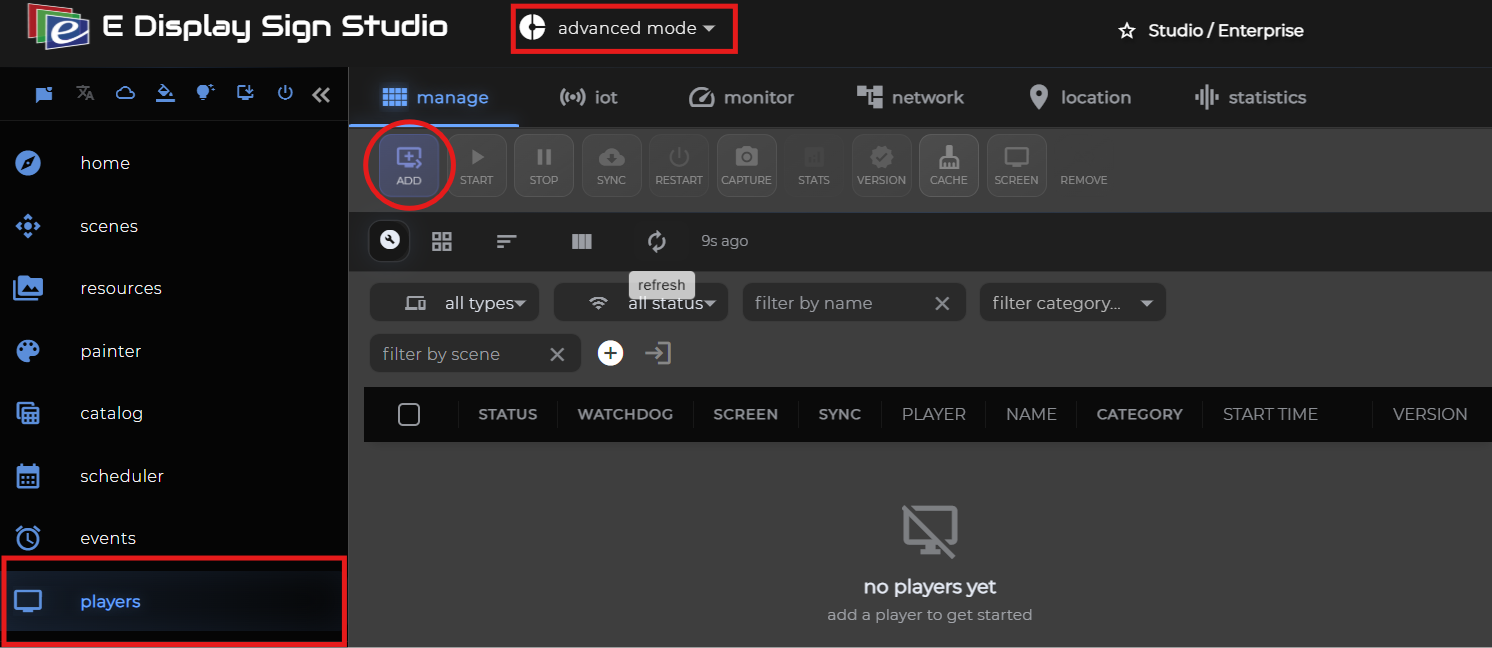
3) Once you are logged in, make sure Advanced Mode is selected at the top.

4) Go to the players section on your main menu.
5) Click the Add button on the top toolbar to add a new player (highlighted in the screenshot below).
3) Once you are logged in, make sure Advanced Mode is selected at the top.
4) Go to the players section on your main menu.
5) Click the Add button on the top toolbar to add a new player (highlighted in the screenshot below).
6) In the Add Player window:
- Click the (+) icon to select the scene you would like to assign to the player.
- Enter a Player Name.
- Enter the 4-digit registration code displayed on your TV screen
- Click Register SignPlayer to complete the registration.
Related Articles
How to Add YouTube video on campaign using Studio Lite
Step-1: Choose Youtube video and copy the video Id in our case it will be the following video: https://www.youtube.com/watch?v=d7LCf_65-R4 (Video Id: d7LCf_65-R4) Check Video duration: 1 min 45 seconds. Step-2: Add Youtube component to Channel on ...How to add RSS (Really Simple Syndication) component in Studio lite
Step:1 Add Really Simple Syndication (RSS) component to Channel on Campaign. Step-2: Select RSS news source from the available drop down options or the custom source and provide the link. Step-3: a- Set the time duration b- Select the scroll speed, ...Youtube keeps Blinking - Sign Player
If your YouTube component section keeps blinking on the Sign player please apply the below settings on your player. 1. On your Windows or Android Player open Chrome browser 2. Click on the Three Dots on the Right Top Section 3. Click on the Settings ...How to Remove a Player from Sign Studio
To remove your existing player in Sign studio please refer to the steps below: 1) Make sure Advanced Mode is selected from the top. 2) Go to the players section on your main menu. 3) Check mark the media player that you would like to remove. 4) ...Sign Player Multi Screen setup on a Windows Player
Setting up a Multi Screen On a Windows player you need to enable the Collage or Combine desktop Settings from the Intel Graphics Settings. You can go to Intel Graphics Support Settings Click on Display Activate Combine Desktop.